11s
Opening · 10s film
Lens Flare Effect
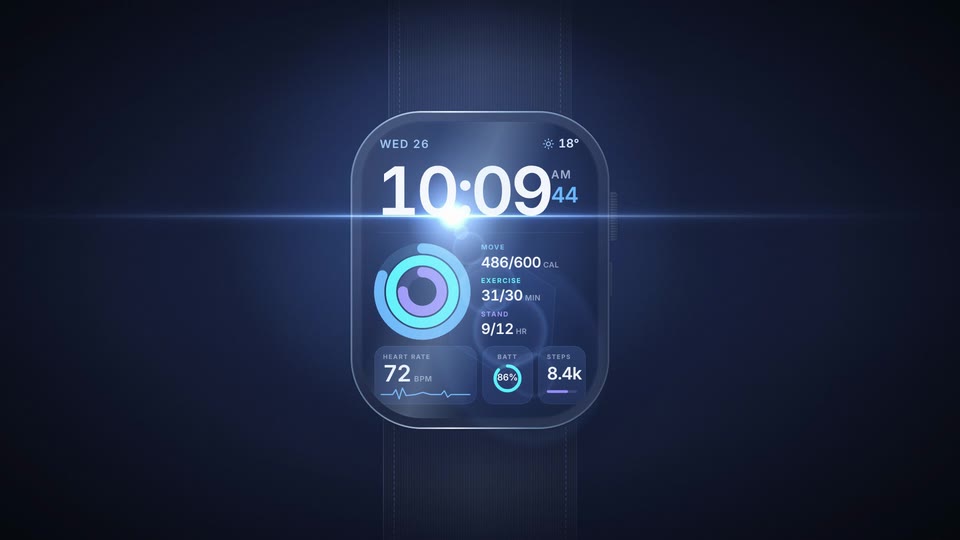
A smartwatch on black. A long thin blue streak sweeps across the frame with a chain of chromatic ring and hexagon ghosts placed opposite the source along the line through the frame centre. The title Aster Series 2 rises, a smaller flare crosses it from right to left, and a short lockup closes the film.
Seen in real launch films
How to make a Lens Flare Effect with Claude Code or Codex
Copy the recipe above and paste it into Claude Code or Codex. The agent installs the skill and builds the shot.
npx skills add krisyangdev/motionboardHow it's built
Compute the whole flare from one source point S, every frame, from the timeline time. Flare A moves from x -420px to 2340px between 1.25s and 5.0s, with y on a curve from 200px through 442px to 330px, and travel p + 0.11·sin(2πp) so it is slowest above the subject. Draw a core of 95px radius, three streak layers with half-lengths 1250/1000/780px and half-heights 34/9/2.6px, and a bloom of 460px radius, all with additive blending.
Place the ghosts on the line through S and the frame centre: position = centre + g × (S − centre), with g values from -1.95 to +0.70, so they move opposite the source. Use rings with three chromatic fringes at radius ratios 0.955/1.0/1.05, discs, one hexagon of 118px radius and one large disc of 205px radius. Fade the ghosts with smoothstep(0.04, 0.4, d/960) and raise a veiling glare of exp(−d²/640²) as the source nears the centre. At 5.95s a second flare scaled to 0.62 crosses the title from right to left until 7.4s.
Press the copy button to send this recipe to Claude Code or Codex, or install the skill once with npx skills add krisyangdev/motionboard. The agent builds the watch face, the canvas flare and the title. Draw the mark at 7.85s, wipe in the word Aster at 8.25s and flash a short flare on the mark at 8.4s. Render an MP4 with HyperFrames, or port the GSAP timeline to your website.
Full recipe
Why it works
Every part of the flare comes from one source position, so the optics read correctly: the ghosts sit on the line through the source and the frame centre, they move left when the light moves right, they weaken and the veil thickens as the source nears the centre, which is how a real lens behaves. The streak is a thin horizontal line (2.6px to 34px high, up to 2500px long) like an anamorphic lens produces, and the ghosts are rings, discs and a hexagon (the shape of aperture blades) with three chromatic fringes on the rings. These details make the flare read as light inside a lens, and a glow texture pasted over the picture would lack them. The light moves slowest over the watch (about 0.31x speed mid-frame), which gives the viewer time to read the face. The rim of the case, the highlight on the glass and the bright band on the title all follow the same source x, so the light seems to fall on the objects. A black frame and one cool blue accent keep the picture clean and the flare is the only bright thing in it. The second flare is scaled to 0.62 with five ghosts and crosses the title, and each letter brightens as the light reaches it; a short pulse on the mark ends the film.
Spec
- Timing
- Film 10s. The watch fades up 0–1.1s with a 24px rise; face elements appear in turn 0.45–1.85s; the activity rings fill 0.7–2.5s; flare A crosses the watch 1.25–5.0s (3.75s); the watch leaves 4.55–5.25s (0.7s); the title starts at 5.05s (1.2s, the two words 0.14s apart); flare B runs 5.95–7.4s (1.45s); the title fades at 7.4s (0.45s); the mark ring draws at 7.85s (0.8s), the asterisk at 8.0s (1.0s), the wordmark at 8.25s (0.9s) and the tagline at 8.75s (0.8s); flare C flashes on the mark at 8.4s and decays with a 0.5s time constant; hold to 10s
- Easing
- Source travel
p + 0.11·sin(2πp): about 0.31x speed in mid-frame and about 1.69x at the ends, so the light moves slowest above the watch; intensity fades in over the first 14% and out over the last 14% with smoothstep; face elements and the title use expo.out (cubic-bezier(0.16,1,0.3,1)); the watch fades in with power2.out and leaves with power2.in; the mark ring draws with power3.inOut; the activity rings use 1−(1−x)³ - Camera
- Locked frame, no roll. The watch layer pushes linearly from 1.04x to 1.1x over 0–4.55s, then to 1.22x with a 10px blur and a fade over 4.55–5.25s; the title layer pushes linearly from 1x to 1.03x over 4.9–7.9s; the flare canvas sits in screen space and ignores the camera
- Subject
- Case 480x590px with a 132px radius; display inset 20px (440x550px, 112px radius); dark woven bands above and below (340px and 360px wide, fading out toward the frame edge); crown 22x92px on the right. Face: WED 26, 18°, time 10:09 (Inter 600, 124px), seconds counting up from 42 once a second; three activity rings with radii 80/58/36px and 19px stroke filled to 81%, 100% and 75%; MOVE 486/600 CAL, EXERCISE 31/30 MIN, STAND 9/12 HR; three tiles, HEART RATE 72 BPM, BATT 86% and STEPS 8.4k. Flare A's source runs from x -420px to 2340px with y on a quadratic curve 200→620 (control point)→330px, about 442px at the centre; three streak layers with half-lengths 1250/1000/780px and half-heights 34/9/2.6px; a core of 95px radius. Flare B is scaled to 0.62, with its source running from x 2200px to -300px, y 505→548px, intensity 0.85. Ghost position = frame centre + g × (source − centre), eight ghosts: g=-0.30 ring r58, -0.55 disc r24, -0.84 hexagon r118, -1.12 ring r76, -1.50 big disc r205, +0.40 ring r34, +0.70 disc r15, -1.95 ring r46; flare B uses five of them. Title Aster Series 2 (Inter 700, 176px, letter-spacing -0.045em)
- Sync
- Ghosts, streaks, core, veiling glare, the rim light on the case, the diagonal sheen on the glass and the highlight band on the title all come from one source function evaluated every frame, so they move with the light; ghosts sit on the opposite side of the centre and fade out as the source nears it (strength smoothstep(0.04, 0.4, d/960) with d the source's distance from the centre); the veil peaks with the source near the centre, falling off as exp(−d²/640²); while flare B crosses the title, the highlight band of each word is centred on the source x; flare C starts at 8.4s once the mark is drawn
- Style
- Background
#04050a, one accent cool blue#4da3ff; flare colours (70,130,255), (130,190,255) and (235,245,255); ring ghosts use three chromatic fringes at radius ratios 0.955/1.0/1.05 in (255,95,175), (60,235,225) and (85,120,255); the flare canvas uses screen blending; 7% grain and a vignette to 60% black at the edge; Inter throughout
Prompt
Build a 10-second, 1920x1080, 30 fps dark product film called Lens Flare Effect for a fictional product, Aster (a smartwatch). Background #04050a and one accent, cool blue #4da3ff. Draw the flare on a single 1920x1080 canvas: fill it black every frame, draw with the lighter composite operation, and lay the whole layer over the scene with mix-blend-mode: screen. Every state is a pure function of time: one empty tween that spans the film calls render(time) from its onUpdate (plus an hf-seek listener), with no Math.random, no Date and no CSS animation. The light is a moving point S. Each frame draw: a veiling glare (a full-frame fill of (40,80,190) at 0.1×v, plus a radial gradient of 1250px radius, where v = intensity × exp(−d²/640²) and d is the distance from S to the frame centre (960,540), so the haze is heaviest with the source near the centre); a bloom of 460px radius; three horizontal streak layers drawn as elliptical radial gradients with half-lengths 1250/1000/780px, half-heights 34/9/2.6px, colours (70,130,255), (130,190,255) and (235,245,255) and opacities 0.30/0.75/0.95, which together make one long thin blue line; a hot white core of 95px radius; and a faint streak on the opposite side of the frame at centre − 0.72×(S − centre), 700px half-length and 5px half-height. Place the ghosts on the line from the source through the frame centre: position = centre + g × (S − centre), recomputed every frame, so when the light moves right the ghosts move left. Use eight: g=−0.30 ring r58, −0.55 disc r24, −0.84 hexagon r118 (rotated to the line), −1.12 ring r76, −1.50 large ellipse disc r205, +0.40 ring r34, +0.70 disc r15, −1.95 ring r46. Draw each ring ghost as three chromatic fringes at radius ratios 0.955/1.0/1.05 in (255,95,175), (60,235,225) and (85,120,255), and multiply ghost strength by smoothstep(0.04, 0.4, d/960) so the ghosts vanish when the source is near the centre. The frame: the watch sits at the centre, case 480x590px with a 132px radius, a dark metal gradient and a cool bright line along the top edge, display inset 20px (440x550px, 112px radius), dark woven bands above and below fading out toward the frame edge. The face is dense: WED 26, 18°, time 10:09 (124px), a seconds counter that adds 1 every second, three activity rings of radius 80/58/36px, MOVE 486/600 CAL, EXERCISE 31/30 MIN, STAND 9/12 HR, HEART RATE 72 BPM with an ECG line, a BATT 86% ring and STEPS 8.4k. The bright line on the case edge and the diagonal sheen on the glass are computed from the source x and follow the light. Timeline: 0–1.1s the watch fades up; 0.7–2.5s the activity rings fill; 1.25–5.0s flare A travels from left of the frame (x=−420px) to right of it (x=2340px), with y along a curve 200→442→330px, sweeping over the watch, using travel p + 0.11·sin(2πp) so it is slowest mid-frame; 4.55–5.25s the watch scales to 1.22x and leaves with a blur and a fade; at 5.05s the title Aster Series 2 (Inter 700, 176px) rises one word at a time under a small INTRODUCING line; 5.95–7.4s flare B (scale 0.62, five ghosts) crosses the title from right to left, with a highlight band on the letters that follows the source x so each letter brightens as the light reaches it; at 7.4s the title fades out; from 7.85s the lockup: a ring draws, an asterisk mark spins in, the wordmark Aster (Inter 600, 112px) wipes in from the left and the tagline Time, in depth. fades up, and at 8.4s a short flare (streaks and core, no ghosts) flashes on the mark. Add 7% grain and a vignette.
People describe it as
- A long thin blue line sweeps across the watch
- Round and hexagonal light spots move opposite the light source
- The light passes over the title and the letters light up in turn
Often confused with
- Light RevealLight Reveal uses a sweeping light to bring out the material of an object on black; here the light is a lens artifact, with streaks, ghosts and veiling glare computed from the source position each frame and added over the product and the title.
- Light Beam EffectIn Screen Projection Beams the beam is a window onto a fixed screen; the flare here hides and reveals nothing, it adds a layer of light spots that move with the source.
FAQ
What is a lens flare effect?
A lens flare is light that scatters inside a camera lens when a bright source is in or near the frame. It appears as a streak, a hot core, a veil of haze and a chain of ghost discs and rings. Product films add it to give a shot the look of real optics.
How do you make a lens flare in HTML and canvas?
Draw it on a canvas with additive blending and compute every part from one source point each frame. Put the ghosts at centre + g × (source − centre), so they move opposite the source, and fade them as the source nears the centre. Redraw the canvas from the timeline time so the render is deterministic.
Is it free to use?
Yes. Motionboard is free and MIT licensed, so you can use and modify the recipes and the films they produce in personal and commercial projects. The licence asks only that copies of the recipe files keep the copyright notice.