11s
Opening · 10.5s film
3D Ribbon Text Animation
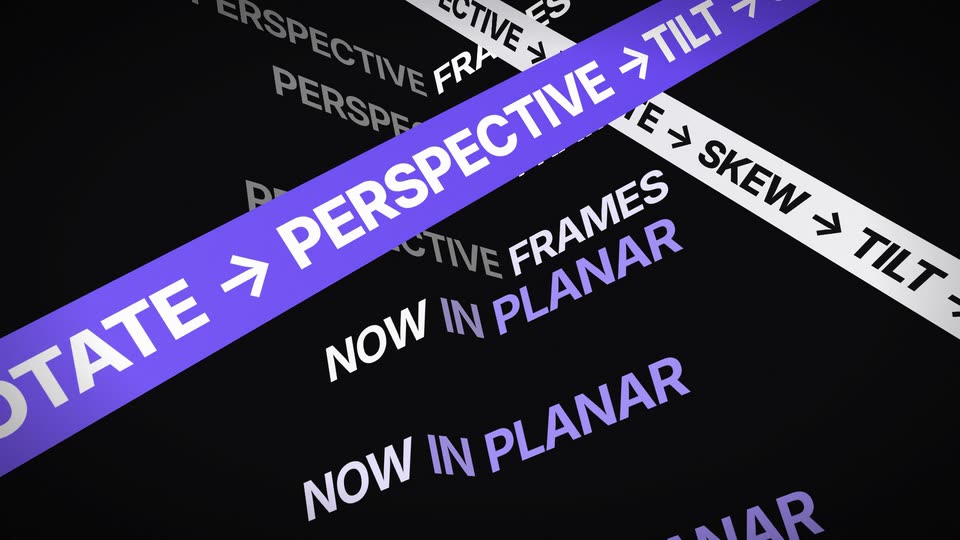
A two-line title folds between its words into zig-zag 3D ribbons and multiplies into a field of rows, wide arrow bands sweep past the camera, the last band fills the frame and wipes to the product UI, and the film ends on the product wordmark.
Motionboard shot: Folded Ribbon Text
Seen in real launch films
How to make a 3D Ribbon Text Animation with Claude Code or Codex
Copy the recipe above and paste it into Claude Code or Codex. The agent installs the skill and builds the shot.
npx skills add krisyangdev/motionboardHow it's built
Cut each title line at the word breaks, one panel per word (PERSPECTIVE 865px and FRAMES 545px in line one; NOW 348px, IN 161px and PLANAR 537px in line two), set in Inter 700 at 128px. From 1.0 to 2.3s rotate neighbouring panels alternately by 37° with easeInOut (the two title rows overshoot to about 44° near 2.3–2.5s, then settle back to 37°) so their edges stay joined and the strip folds into a zig-zag whose creases fall between words, while the camera pitches down to 26° with a 2400px perspective. Then open the row spacing from 176px to 340px and add 6 more rows from 2.25 to 3.38s.
From 3.0 to 5.05s send four bands (300, 230, 420 and 160px high) past a camera that dollies in 360px with 1100px perspective, with TILT → SKEW → ROTATE → PERSPECTIVE → and three other short arrow lines scrolling along them at 1100–1700px/s. A 3000px violet band with two lines of 620px type wipes across from 4.3 to 5.8s and covers the frame at 5.05s, where the scene switches to the product UI.
Press the copy button to send this recipe to Claude Code or Codex, or install the skill once with npx skills add krisyangdev/motionboard. The agent builds the folded strips, the band scene and the wipe with GSAP. Render an MP4 with HyperFrames, or port the timeline to your website.
Full recipe
Why it works
The title is already rising on the first frame. Each word group gets its own panel, so every crease falls between words and every face shows a whole word, which keeps the title readable while it folds. The fold stays near 37° and the camera pitch is moderate, so no panel turns edge-on, and the multiplied rows sit 340px apart so no row crosses another. The wide bands carry arrow copy that names the feature (TILT → SKEW → ROTATE → PERSPECTIVE) and double as the transition: the editor appears on the frame where the last band covers the screen, with no extra transition element. In the editor one drag turns the frame and a second drag changes the perspective distance, then the editor dims and the wordmark holds at a large size to the end. The whole film uses black, white and one violet accent.
Spec
- Timing
- Film 10.5s. Title rises line by line through a mask 0–0.8s (expo.out, second line 0.12s later), accent color sweeps across both lines panel by panel 0.3–1.16s; fold 1.0–2.3s (1.3s, 39 frames), second line 0.1s later; row spacing opens from 176px to 340px (1.0–2.4s); 6 more rows multiply 2.25–3.38s (0.95s each, staggered 0.09s per ring); violet sweep over the rows 2.79–3.87s; the four wide bands enter at 3.0s, 3.3s, 3.55s and 3.75s and run to 5.05s; wipe 4.3–5.8s, full cover at 5.05s; editor from 5.05s, Rotate Y handle drag 6.25–7.3s, Distance slider drag 7.8–8.3s, editor dims 8.2–8.85s and the wordmark lands 8.35–9.35s, wordmark holds to 10.5s
- Easing
- Title rise expo.out; title fold easeInOut cubic; multiplying rows and editor settle expo.out; Rotate Y drag expo.out; band paths monotone cubic splines, fast then slow; wipe easeInOut cubic; Distance slider sine inOut; wordmark fades with easeOut cubic and rises with expo.out
- Camera
- Rows scene, perspective 2400px: camera pitches down 0°→26° (2.3s)→30° (3.3s)→34° (4.6s)→36° (5.05s), rolls −6°→−10°→−22° (4.6s)→−27° (5.05s), yaw within 4°; it pulls back 300px at 2.3s and 560px at 3.3s to fit more rows, then dollies in to +400px at 4.6s and about +617px at 5.05s. Bands scene, perspective 1100px: dolly 0→360px (3.0–5.1s), roll 0°→−8°. The editor settles from 1.14x scale, 7° tilt and −5° yaw to 1.0 in 1.15s (expo.out), pushes slowly from 6.0s with sine inOut to reach 1.05x at 8.35s, then pulls back to 0.97x as it dims and drifts back to 0.99x by 10.5s
- Subject
- Each row is a folded strip with one panel per word group, so creases fall only between words: PERSPECTIVE (865px) and FRAMES (545px) in line one, NOW (348px), IN (161px) and PLANAR (537px) in line two; each panel is its word width plus 18px each side (Inter 700, 128px, letter-spacing −0.035em). Neighbouring panels alternate ±37° with their edges joined; the two title rows overshoot to about 44° while folding (peak near 2.3–2.5s, second line 0.1s later) and settle back to 37° by 3.4s (second line 3.5s) so the zig-zag shows sooner; from 2.25s every row breathes ±3°, 34–44° in all; panels leaning away drop to 50% brightness. 8 rows in all, 4 of PERSPECTIVE FRAMES and 4 of NOW IN PLANAR, 340px apart. Bands are 300px, 230px, 420px and 160px high and 9000px wide with text scrolling along them (1100–1700px/s); the wipe band is 3000px thick and carries two lines of 620px type that cross the frame near 4.95s and 5.05s, so the cover frame still shows type, with a 150px white band and a 120px dark band beside it. The editor window is 1700x900 with three phone frames on the canvas
- Sync
- The last band fills the frame at 5.05s, the rows and bands scenes end on that frame and the editor shows underneath; during the Rotate Y drag the value, the Home frame on the canvas, the highlight box on the Y field and the tooltip above the frame (it follows the cursor sideways) change on the same frame, and the cursor stays on the handle; during the Distance drag the Distance field lights up and the frame's perspective distance changes from 1200px to 450px in step
- Style
- Background
#050507, white type, violet accent#6e56ff(band gradient#5b44f0→#7a65ff, light violet type#a597ff); three band looks: white type on violet, black type on near-white, violet type on black; the editor is a dark UI with three light phone frames; at the end the editor drops to 20% opacity, a dark radial scrim fades in behind the mark (8.0–8.5s) and the Planar wordmark sits centered (120px icon, Inter 700 at 136px, fading in from 8.35s and growing 2.5% to 10.5s)
Prompt
Build a 10.5-second opening called Folded Ribbon Text for a design tool named Planar, 1920x1080, background #050507, white type and one violet accent #6e56ff, font Inter. From 0s a two-line title PERSPECTIVE FRAMES / NOW IN PLANAR rises line by line through a mask (0 to 0.8s, expo.out, second line 0.12s later) (Inter 700, 128px, letter-spacing -0.035em, PLANAR in #a597ff); from 0.3 to 1.16s the accent color #a597ff sweeps across both lines left to right, panel by panel. From 1.0 to 2.3s (easeInOut cubic, second line 0.1s later) split each line into one panel per word, each panel as wide as its word plus 18px on each side (line one: PERSPECTIVE 865px, FRAMES 545px; line two: NOW 348px, IN 161px, PLANAR 537px), so every crease falls between words; rotate neighbouring panels alternately by ±37° with their edges joined so the strip folds into a zig-zag, and drop panels that lean away to 50% brightness; the two title rows overshoot to about 44° (peak near 2.3–2.5s, second line 0.1s later) and settle back to 37° by 3.4s; the camera uses 2400px perspective, pitches down to 26° and rolls -6°. From 1.0 to 2.4s open the row spacing from 176px to 340px, and from 2.25 to 3.38s multiply 6 more rows (3 of PERSPECTIVE FRAMES above, 3 of NOW IN PLANAR below; 0.95s each, expo.out, fading in, staggered 0.09s per ring), with the fold angle breathing ±3°, the camera pulling back to 560px and pitching to 30° with -10° roll, and a violet sweep running across the rows from 2.79 to 3.87s. From 3.0 to 5.05s four wide bands (300, 230, 420 and 160px high, 9000px wide; white type on violet, black type on near-white, violet type on black, and a thin violet band; entering at 3.0, 3.3, 3.55 and 3.75s; text TILT → SKEW → ROTATE → PERSPECTIVE →, PERSPECTIVE → ROTATE → SKEW → TILT →, SKEW → TILT → ROTATE → PERSPECTIVE → and NOW IN PLANAR →, scrolling at 1500, 1300, 1100 and 1700px/s) fly in from off-screen in a second 3D scene with 1100px perspective that dollies in 360px and rolls -8°, while the rows camera reaches 34° pitch, -22° roll and +400px dolly at 4.6s and about 36° pitch, -27° roll and +617px dolly at 5.05s (yaw stays within 4°), and the rows fade to 32% between 3.4 and 4.5s. From 4.3 to 5.8s a 3000px-thick violet band (tilted -26°, with two lines of 620px type PERSPECTIVE → FRAMES → on it that cross the frame near 4.95s and 5.05s, and a 150px white band and a 120px dark band beside it) sweeps across with easeInOut cubic and fills the frame at 5.05s; on that frame swap the rows scene for the Planar editor (a 1700x900 dark window: layers on the left, three phone frames on the canvas, a properties panel on the right with a Perspective section). The window settles from 1.14x scale, 7° tilt and -5° yaw to 1.0 in 1.15s with expo.out, then from 6.0s pushes slowly with sine inOut to reach 1.05x at 8.35s. The cursor fades in at 5.5s and reaches the handle at the right-middle of the selected frame at 6.15s; from 6.25 to 7.3s it drags the handle and Rotate Y goes 0° to -38° with expo.out, with the frame, the value, the highlight box on the Y field and a Rotate Y -38° tooltip above the frame (following the cursor sideways) changing on the same frame; from 7.4 to 7.78s the cursor moves to the Distance slider and from 7.8 to 8.3s it drags it, the frame's perspective going 1200px to 450px with sine inOut and the Distance field lighting up. From 8.2 to 8.85s the editor drops to 20% opacity and pulls back to 0.97x (then drifts back to 0.99x by 10.5s), a dark radial scrim fades in behind the mark from 8.0 to 8.5s, and from 8.35s the Planar wordmark (a 120px violet icon and 136px Inter 700 text) fades in centered and rises 36px with expo.out until 9.35s, then holds to the end.
People describe it as
- A title folds into 3D ribbons and multiplies
- Wide arrow bands sweep past the camera
- The last band covers the frame and wipes to the product UI
Often confused with
- Wipe and Flash TransitionForeground Wipe & Flash hides the frame behind a foreground object and flashes to change scene; Folded Ribbon Text uses bands that carry feature copy as the transition and wipes straight to the product UI.
- Kinetic TypographyScattered Spec Type places spec words around the lens; Folded Ribbon Text takes one title line, folds it into ribbons, multiplies it and sweeps bands over it.
FAQ
How do you make text fold into 3D ribbons?
Split one line at its word breaks into panels that each show one word, then rotate neighbouring panels in opposite directions by about 37° and move each panel so its edge meets the previous one. Animating the angle from 0° over 1.3s folds the strip into a zig-zag, and because the creases fall between words every word stays readable.
How do the bands work as a transition?
The bands carry copy that names the feature and move through a second 3D scene. A thick band sweeps across at 4.3–5.8s and covers the screen at 5.05s, so the next scene can replace the ribbons on that frame.
Is it free to use?
Yes. Motionboard is free and MIT licensed, so you can use and modify the recipes and the films they produce in personal and commercial projects. The licence asks only that copies of the recipe files keep the copyright notice.