Device Push-in FocusProduct reveal
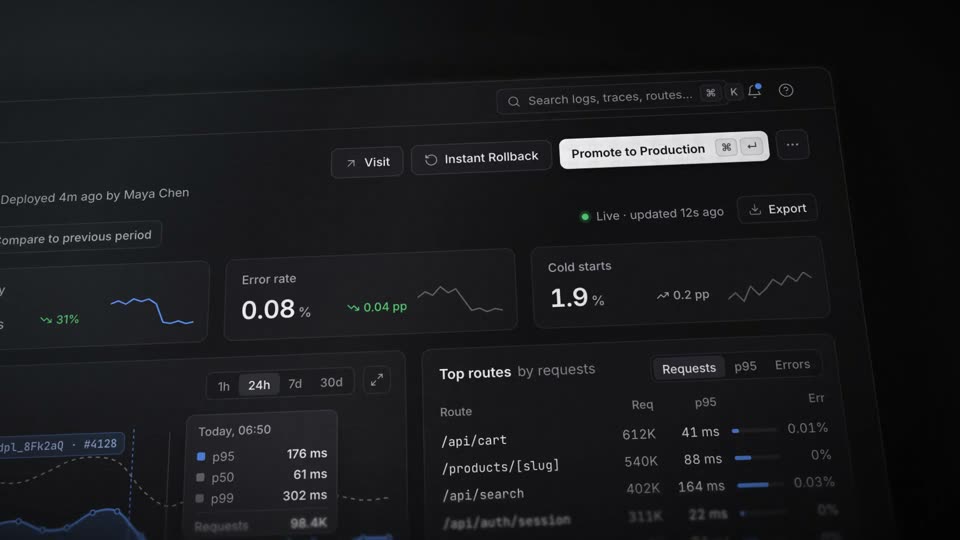
Motionboard shot: Tilted UI with Depth of Field
A UI plane tilted 10–15° and shot up close, with only the active row in focus and the rest blurred.
Build the panel (760×500px) in DOM and tilt it with CSS 3D: perspective 1200px, rotateX 18°, rotateY −16°, rotateZ 5°, scale 2.3. Pan the camera linearly sideways (x 110 to −150px) over 8s while a follow offset keeps the active line at about 40% of frame height.
Fake the depth of field with the sharp panel plus two blurred copies (4px next to the focus band, 13px beyond), cross-faded through 60px and 200px masks. The band is 168px of panel height and jumps to the highlighted row in 0.22–0.35s on expo.out. The pull-back at 8.0s halves the tilt, scales 2.3 to 1.5 and widens the band to the whole panel.
Press the copy button to send this recipe to Claude Code or Codex, or install the skill once with npx skills add krisyangdev/motionboard. The agent builds the panel in DOM with grain at 8% opacity re-rolled every 3 frames. Render an MP4 with HyperFrames, or port the GSAP timeline to your website.
npx skills add krisyangdev/motionboardTilt, shallow depth of field, and grain make the screen UI read as a physical object, and they match the color grade of the live-action shots before and after it. Only the row being typed in is in focus, so the eye has nothing to search for.
linear; panel slide-in, row reveals, highlight hops, focus jumps and the pull-back cubic-bezier(0.16,1,0.3,1) (expo.out); select press back.out(2)perspective 1200px; panel (760×500px) rotated rotateX 18°, rotateY −16°, rotateZ 5° at scale 2.3; camera close, panning slowly sideways (x 110→−150px) while a follow offset keeps the active line at about 40% of frame height; the in-focus band is 168px of panel height, about 36% of frame height, and the pull-back at 8.0s halves the tilt (9°, −8°, 2.5°), scales 2.3→1.5 and widens the band to the whole panelblur 4px next to the band, 13px beyond it) cross-fade over 60px and 200px masks; typing at about 30ms per letter with 75ms per space, caret blinking on a 1s cycle; the highlight moves down two rows of the results, then the answer streams line by line#ff6a3d land on the same frame at 6.3s#070708 backdrop with five blurred white diagonal bands (−25°, opacity 0.07–0.14) drifting 288px (15% of frame width) over 9s; panel rgba(28,28,30,0.78), radius 14px, 1px border rgba(255,255,255,0.10); grain at 8% opacity re-rolled every 3 frames; vignette to 45% black; orange accent #ff6a3dBuild a close-up of your interface called Tilted UI with Depth of Field as a 10-second film. Put a 760×500px command-palette panel in a CSS 3D container with perspective 1200px, rotateX 18°, rotateY −16°, rotateZ 5°, scaled 2.3x, on a near-black #070708 backdrop with blurred diagonal light bands, 8% grain and a vignette. The panel slides in over 1.0s with expo.out and the camera pans sideways at linear speed for 8 seconds. Only the active row is sharp: stack three copies of the panel (sharp, blur 4px, blur 13px) under masks that cross-fade over 60px and 200px, with an in-focus band of 168px of panel height (about 36% of the frame) that jumps to the active row with expo.out. Type a 47-character query at about 30ms per letter (75ms per space) from 1.4s with a cursor blinking every 1s; at 3.3s swap to the results, whose rows fade in staggered 0.05s; from 4.4s a highlight moves down two rows (0.22s hops), and at 6.3s the selection presses (scale 0.98 then back.out(2)) while its tag turns orange on the same frame; then stream a 7-line answer 0.18s per line. At 8.0s pull back with expo.out over 0.9s: halve the tilt, scale 2.3x to 1.5x and widen the focus band to the whole panel, then fade in the wordmark.
Depth of field is the range of distances that appear sharp in an image. A shallow depth of field keeps one plane sharp and blurs what lies in front of and behind it, which directs attention to the sharp area.
Yes. This recipe stacks blurred copies of the same panel and reveals the sharp one through a mask band that follows the active row. The same markup works in a video render and on a web page.
Yes. Motionboard is free and MIT licensed, so you can use and modify the recipes and the films they produce in personal and commercial projects. The licence asks only that copies of the recipe files keep the copyright notice.