10s
Motionboard recreation · no launch-film original
Product reveal · 10.5s film
Dolly Zoom Effect
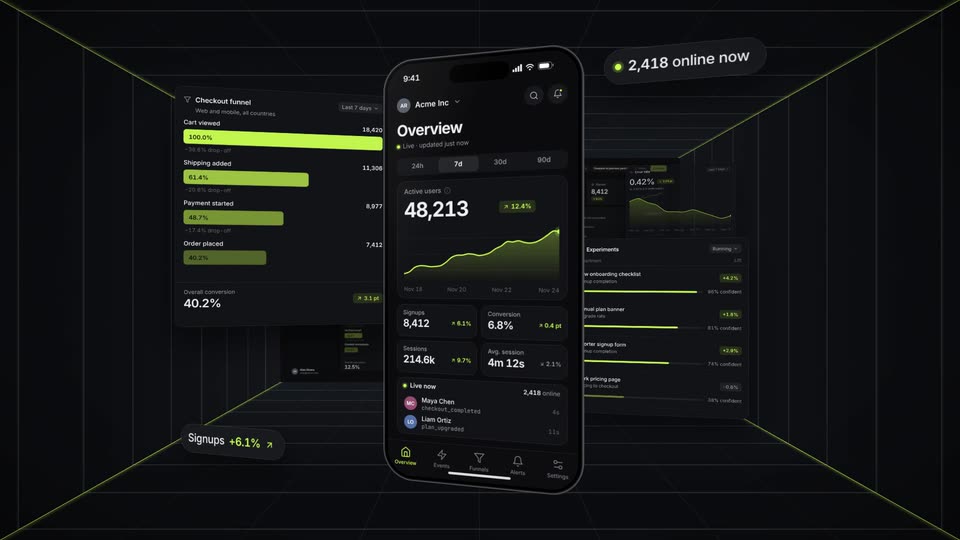
The camera backs away while the lens zooms in, so the phone holds its size in frame, the perspective behind it flattens, and the hall collapses into one wall of dashboard.
Motionboard shot: Dolly Zoom Reveal
How to make a Dolly Zoom Effect with Claude Code or Codex
Copy the recipe above and paste it into Claude Code or Codex. The agent installs the skill and builds the shot.
npx skills add krisyangdev/motionboardHow it's built
Put the subject on the z=0 plane of a CSS 3D world and animate only the stage perspective. From 1.0 to 5.8s it grows from 950px to 7000px, eased in log space with cubic-bezier(0.55,0.05,0.5,1), which narrows the vertical field of view from about 59° to about 9°. The phone stays 410×864px while everything behind it changes, and the wall keeps growing until 5.8s instead of settling early.
Build the background as depth cues: a hall 2760×1552 and 2800px long with four 6px light strips and 9 rings every 280px at 20% white, six dashboard windows at z=−300 to −2400, and a web dashboard wall at z=−2800 that is 2650px wide. As the camera backs away the dashboard grows from 671px to 1893px wide, and two chips at z=+170 shrink from about 1.22 at 1.0s to about 1.18 at 2.1s, when they start to fade. Slide the windows out between 1.6 and 2.7s, each fading over 0.4s as it slides 450px, with the two nearest starting at 2.2s and 2.3s, so the wall behind the phone is clear before it becomes readable.
Press the copy button to send this recipe to Claude Code or Codex, or install the skill once with npx skills add krisyangdev/motionboard. The agent builds the world, the phone screen and the dashboard from your product. Render an MP4 with HyperFrames, or port the GSAP timeline to your website.
Full recipe
Why it works
Camera distance and focal length move in opposite directions, so the subject keeps its size while only the perspective behind it stretches or flattens. The viewer sees the space deform without finding where the camera moved. The shot starts wide, with the hall converging on a vanishing point and small windows on its sides, and ends long, with the hall pressed flat and one wall filling the frame, so the change itself is the reveal. The foreground chips sit nearer to the camera than the phone, so they shrink as the camera backs away while the background grows, which shows which layer is moving.
Spec
- Timing
- Film 10.5s. 0–0.9s fade in from black; 0–1.0s slow creep back (distance 905→950px); 0.1–0.95s the hall rings light up from far to near (0.5s each, 0.05s apart) and the light strips fade in over 0.1–1.0s; 1.0–5.8s dolly zoom (4.8s, 144 frames); 5.8–10.5s slow residual drift (distance 7000→9800px); 0.1–1.3s phone rises; 0.5–1.8s the six floating windows are revealed top-down with expo.out (0.8s each, 0.1s apart, fully opaque); 0.5–1.7s the phone's hero number counts 47,602→48,213 and the line chart draws over 0.5–1.8s; the two chips pop in at 0.9s and 1.1s (0.6s each, back.out(1.6)); 1.6–2.7s the six windows slide out to the sides in turn while fading (each slides 450px over 0.6s and fades over 0.4s starting at the same moment: the four far ones from 1.6s, 0.15s apart; the two nearest, at z=−300 and z=−600, from 2.2s and 2.3s), and no window is left on the wall from 2.7s; 2.1–2.7s the two chips fade; 5.0s a new signup lands on the phone and on the web dashboard in the same frame; 6.2–7.6s wall darkens and phone moves right, 6.7–8.0s mark, wordmark, tagline and URL enter; hold to 10.5s
- Easing
- Distance is eased in log space with
cubic-bezier(0.55,0.05,0.5,1): distance = 950 × (7000/950)^e, about 1,100px at 2.0s, 1,800px at 3.0s, 4,000px at 4.0s and 6,400px at 5.0s, so the wall is still growing between 3.8s and 5.8s; residual drift 7000→9800px with power1.out; phone tilt −16°→−9° withcubic-bezier(0.3,0,0.1,1)over 1.3–5.8s (4.5s), then →−4° with power1.out over 5.8–10.5s; window slide-out power2.in 0.6s with a 0.4s power2.out fade; window reveal, lockup entrance and the phone's move right (1.3s) use expo.out - Camera
- CSS 3D,
perspectivegrows from 950px to 7000px, which narrows the vertical field of view from about 59° to about 9° (7.4x). The subject plane at z=0 is unaffected by perspective and stays 1:1. The end-wall dashboard at z=−2800 is 2650px wide in the world (1866×1.42) and grows on screen from 671px to 1893px (2.8x), and the residual drift takes it to 2061px at 10.5s. Foreground chips at z=+170 scale from about 1.22 at 1.0s to about 1.18 at 2.1s, when they start to fade - Subject
- Phone 410×864px (screen 390×844, 54px corner radius), about 16px thick, built from 8 slices, tilt rotateY −30°→−16° (0.1–1.3s, expo.out). Hall 2760×1552 in cross-section and 2800px long, four 6px accent light strips, 9 hairline rings every 280px (white at 20%), grid lines on floor, ceiling and side walls at 7.5–12% white. Six 520px-wide windows whose content is not repeated on the end wall: checkout funnel, alert rules, experiments, error rate, top events, traffic sources, at z=−300 to −2400. The web dashboard is 1866×1050, scaled 1.42x onto the end wall. The two chips sit in empty space: the online count outside the phone's top-right corner, Signups +6.1% at the lower left
- Sync
- At 5.0s the phone's Live now list and the web dashboard's Live events both insert a Priya Nair signup_completed row, both Signups values change from 8,412 to 8,413 and online users go 2,418→2,419; both chips have faded by 2.7s, and the +6.1% on the Signups chip matches the KPI on the phone and the web dashboard; the lockup enters after the phone has moved right (from 6.7s)
- Style
- Dark, background
#09090b, one accent#c9f24b; UI in Inter: dashboard text 11–14.5px with a 19px page title and 28–30px values; window text 11–15px (windows scaled 1.18x) with 24–34px values; phone text 10.5–16.5px with 21px KPI values, a 32px Overview title and a 42px hero number; wordmark Vantage 156px, tagline 40px, URL button 28px; vignette to 55% black, wall dimming from 22% to 65% plus a scrim behind the lockup that is about 97% black on the left and 50% black on the right
Prompt
Build a product reveal called Dolly Zoom Reveal as a 10.5-second dark film (#09090b, accent #c9f24b). Use a CSS 3D world whose stage perspective is driven by a variable and whose subject plane is z=0. The subject is a phone (410×864px, screen 390×844) rebuilt in DOM/SVG as the Vantage mobile Overview screen: Active users 48,213, a 7-day line chart, four KPI cards, a Live now list and a tab bar. It rises from tilt rotateY −30° to −16° over 0.1–1.3s with expo.out; its hero number counts from 47,602 to 48,213 over 0.5–1.7s and the line chart draws over 0.5–1.8s. The background is a hall 2760×1552 in cross-section and 2800px long with four 6px accent light strips (fading in over 0.1–1.0s), 9 hairline rings every 280px (white at 20%, lighting from far to near over 0.1–0.95s, 0.5s each, 0.05s apart), grid lines on the floor, ceiling and side walls (7.5–12% white), six 520px-wide dashboard windows whose content is not repeated on the end wall (checkout funnel, alert rules, experiments, error rate, top events, traffic sources; z from −300 to −2400, each turned 10–14° toward the center), and at the far end (z=−2800) a wall holding the Vantage web dashboard (1866×1050, scaled 1.42x, 2650px wide in the world). Two foreground chips sit at z=+170 in empty space: '2,418 online now' outside the phone's top-right corner and 'Signups +6.1%' at the lower left, with values that match the KPIs in the UI; they pop in at 0.9s and 1.1s with back.out(1.6), 0.6s each. The picture fades in from black over 0–0.9s. Camera: 0–1.0s creep back from distance 905 to 950px; 1.0–5.8s dolly zoom with perspective distance 950→7000px, eased in log space with cubic-bezier(0.55,0.05,0.5,1) (distance = 950 × (7000/950)^e, about 1,100px at 2.0s, 1,800px at 3.0s, 4,000px at 4.0s and 6,400px at 5.0s, so the wall keeps growing between 3.8s and 5.8s), which narrows the vertical field of view from about 59° to about 9° while the phone keeps its size, the hall opens out and flattens, the dashboard on the end wall grows from 671px to 1893px wide to fill the frame, the chips shrink and fade out between 2.1 and 2.7s, and the tilt eases −16°→−9° with cubic-bezier(0.3,0,0.1,1) over 4.5s. The six windows are revealed top-down between 0.5 and 1.8s without transparency, in the order checkout funnel, experiments, alert rules, error rate, traffic sources, top events (expo.out, 0.8s each, 0.1s apart, a clip-path opening from the top edge with a 36px rise). They then slide out 450px to the sides in turn (power2.in, 0.6s) and fade over 0.4s (power2.out) starting at the same moment: the four far ones from 1.6s, 0.15s apart, the two nearest (z=−300 and z=−600) from 2.2s and 2.3s. All windows are gone from 2.7s, so none covers the wall once it is readable. From 5.8 to 10.5s the distance drifts 7000→9800px with power1.out and the tilt goes −9°→−4°. At 5.0s a new signup row (Priya Nair, signup_completed) appears on the phone and on the web dashboard in the same frame, and Signups changes from 8,412 to 8,413 and online users from 2,418 to 2,419. From 6.2 to 7.6s the wall dims to 65% with a scrim of about 97% black on the left and 50% black on the right, the phone moves 470px right with expo.out (1.3s), and the lockup (mark, Vantage 156px, the 40px tagline 'Live product analytics on every screen.', and the 28px button 'vantage.app') enters on the left between 6.7 and 8.0s with expo.out and holds to 10.5s. Use no Date.now or Math.random.
People describe it as
- The phone keeps its size while the hall behind it stretches and flattens
- The camera backs away but the frame seems to push in
- The background goes from a deep hall to one wall of dashboard
Often confused with
- Macro Pull-out RevealMacro Pull-out Reveal pulls the camera back so the subject shrinks; in Dolly Zoom Reveal the phone keeps its size and only the perspective of the background changes.
- Device Push-in FocusDevice Push-in Focus moves the camera toward parts of a device; Dolly Zoom Reveal picks no part and changes the depth of the whole space.
FAQ
What is the dolly zoom effect?
It is a camera move where the camera travels away from the subject while the lens zooms in by the same amount. The subject keeps its size in frame, and the perspective of the background stretches or flattens. It is also called the Vertigo effect.
How do you make a dolly zoom in HTML and CSS?
Place the subject at z=0 inside a preserve-3d world and give objects behind it negative z values. Then animate the perspective distance on the stage. Objects at z=0 do not change size, while objects behind them grow as the distance increases.
Is it free to use?
Yes. Motionboard is free and MIT licensed, so you can use and modify the recipes and the films they produce in personal and commercial projects. The licence asks only that copies of the recipe files keep the copyright notice.